












Detect assembly errors before they become costly.
Vision AI inspects every assembly step using a camera at the workstation. Missing parts, mixed-up components, and incorrectly routed cables are detected before the next step begins.
What is Vision AI?
Vision AI is camera-based inspection software in CSP’s Manufacturing OS. It compares each assembly step with pre-trained reference images, reports deviations in real time at the station, and saves an inspection image for each step as proof. The team trains the system on new variants themselves, without programming and without an external service provider. It can be used independently as an inspection station on the production line or as an integrated part of the PG operator assistance system.
Assembly errors are often not noticed until it’s too late
In manual assembly, every step determines the quality. Without continuous monitoring, deviations go unnoticed and only become apparent during the final inspection or at the customer’s site.
Exam only at the end
Traditional exams usually take place only after the final station. The individual work steps and their correct sequence remain unobserved.
Errors go undetected
Missing components or incorrectly routed cables are easily overlooked without a visual inspection and can later affect product quality.
Time-consuming documentation
Manually documenting every step takes time and is prone to errors. It is therefore hardly economically feasible to maintain complete documentation.
Every step is checked before the next one begins
Vision AI uses a camera to verify that each step has been performed correctly. This prevents rework, and verification is generated automatically.
Errors remain at the station
Deviations are marked in the camera image before the next step begins.
Verification without additional effort
Each step is documented with a test image. Audit requests are addressed within minutes.
New Variants in Hours
Training using reference images instead of programming or an external service provider.
No siloed solution
Inspection results are fed into the Manufacturing OS data lake and are available for quality analysis.
Where is the part located, and is it positioned correctly?
Position detection not only checks whether a component is present, but also where it is located. Vision AI detects the position, orientation, and distance in the camera image and reports any deviations before the next step begins.
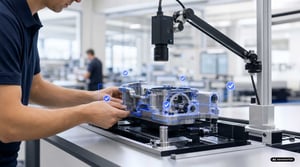
Visual Step-by-Step Inspection
Completeness per step, anomalies, OK/NOK with overlay
Documentation & Verification
Visual Documentation, Traceability, Real-Time Quality Data
Flexible Hardware
Tablet or network camera, regardless of manufacturer
Training with Reference Images
Training without programming; new variants can be added at any time
Take reference images, have them checked, and you’re done
You take a reference image showing the correct condition for each step and define what needs to be inspected. From then on, the camera monitors each step in real time and marks deviations directly in the image.
Works with a USB camera connected to a PC, a camera on a tablet, or a network camera on the production line. Your team can add new variants themselves by providing additional reference images.

Take reference images, have them checked, and you're done
The process from the initial scan to the ongoing review usually takes just a few hours per station.
Take reference photos
Take one photo of the correct condition for each step, right at the workstation.
Define Evaluation Criteria
Define what must be present, correctly positioned, or clearly distinguishable.
Check in real time
The camera evaluates each step and reports "OK" or "NOK" with a mark on the image.
Save proof
The result and test image are automatically added to the traceability system.
Why Shutdowns Fail in Practice.
The most common assumptions don’t hold up under a tax audit. Four of them regularly cost money.
“A backup is sufficient as an archive.”
A backup restores a state. It does not make data analyzable and does not prove immutability. Without structure and a log, it is not evidence.
“We’ll just leave the system as is.”
Interim storage is not the same as archiving. The system continues to become obsolete, knowledge about it disappears, and costs remain unchanged.
“A CSV export is sufficient.”
Flat exports lose relationships, document references, and evaluation logic. The auditor asks about the context, not about tables.
“Once the migration is complete, the issue is resolved.”
Migrations take active data with them and leave the history behind. That’s exactly where the legacy data comes from—data that no one takes responsibility for later on.
Archived where the retention period is longest.
Manufacturing, automotive, medical technology, energy, and financial services: We know the retention periods, the audit logic, and the reports that must be preserved in the archive.
Archived where the retention period is longest.
We understand the retention periods, the audit logic, and the reports that must be preserved in the archive.
“Every company would be well advised to explore the potential of database archiving—as a strategy for the coming decades.”
“Due to the company’s restructuring, we needed to archive the data. We solved this with CHRONOS.”
"We needed long-term access across various systems and the assurance that we were complying with legal requirements."
System Shutdown in the Schlecker Insolvency Case
Complete procedural documentation for the residual liquidation and the auditor.
KLS Martin Group Secures Application Data
Medical technology, data archiving following the restructuring of multiple systems.
Automaker Reduces Storage Costs
Several terabytes of historical production data have been offloaded in an audit-compliant manner.
See what Vision AI detects on your own component in 30 minutes
We’ll show you how to use Vision AI to detect assembly errors right at the workstation, document every step, and reduce the workload on your quality assurance team.


