


Following version 26.6, the next step is here: CSP Manufacturing OS is now available in version 26.8. This release updates the user interface of all products and introduces new features in each one, ranging from database selection in IPM to seven new features in PGX, audit-compliant documentation in QST, and the new web front end in CHRONOS. Here is an overview, organized by product.
|
Contents |
Manufacturing OS: A Consistent Look Across All Products
With version 26.8, CSP’s new user interface is rolling out across all Manufacturing OS products. Colors, typography, icons, and controls now follow a common standard—from IPM to PGX and QST, all the way to CHRONOS and SKILL.
This is more than just aesthetics. Users who switch daily between worker guidance, inspection planning, and archive searches now work in a single interface with consistent logic and terminology, rather than in five disparate applications.
|
IPM: The complete assembly tree in a single call
IPM: BTRV Extension
Component tracking now answers the question that matters most in day-to-day operations: What is currently installed? A new query option returns only active installations, and the SOAP service returns the complete installation tree in a single call. Teams using component tracking and IPM Web users can now view the current installation status instead of every historical installation; partners with a SOAP connection save themselves follow-up queries; and the filtering behavior finally matches what the interface promises.
PGX: Seven New Features in Field Worker Guidance
REST API for Job Data
PGX now provides job data via a documented REST API. Completed jobs, results, and process data can be retrieved directly from the system without database access or individual exports. This provides manufacturing IT and integration teams with a single interface instead of numerous workarounds, allowing them to connect ERP, MES, or BI systems with minimal effort. Job and process data are thus available for reporting and analysis.
Modbus TCP Integration
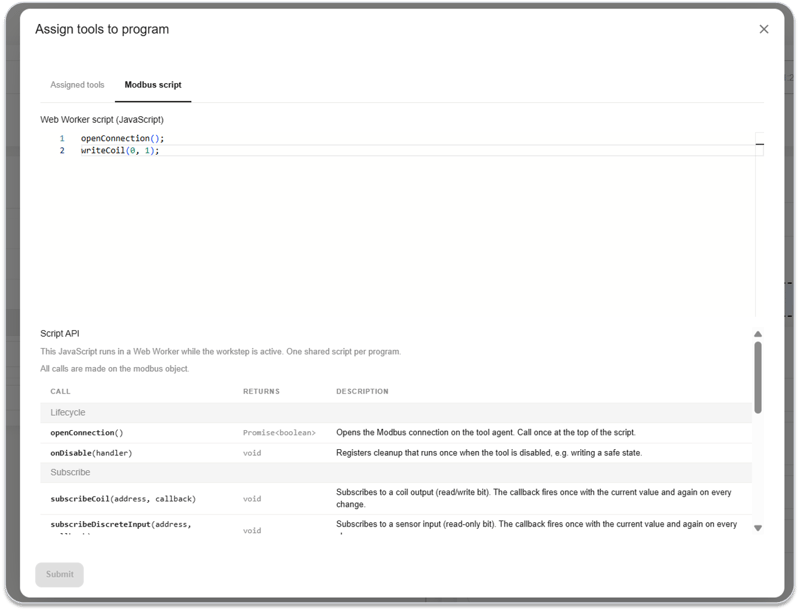
The PGX ToolAgent now supports Modbus TCP. Presses, test benches, and other equipment can be read and controlled directly from the workflow without additional middleware. Process planning and work preparation automate manual steps and document the machine sequence in conjunction with operator guidance. A single interface covers all Modbus-capable devices on the shop floor; the connection is configured per station rather than developed from scratch.
Cycle Times and Timers in the Workflow Engine
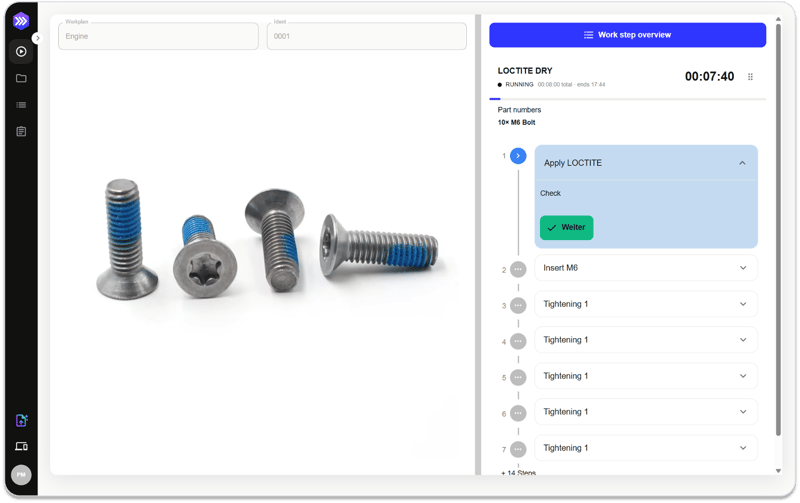
PGX now measures and enforces times directly within the workflow: cycle times per work step and timers for curing, dwell, and wait times—for example, when working with adhesives or sealants. Mandatory wait times can no longer be skipped; the operator sees the remaining time directly at the station, and quality issues caused by steps performed too early or too quickly are reduced. At the same time, actual times for each job are recorded and can be analyzed.
Counter Nodes in the Workflow Engine
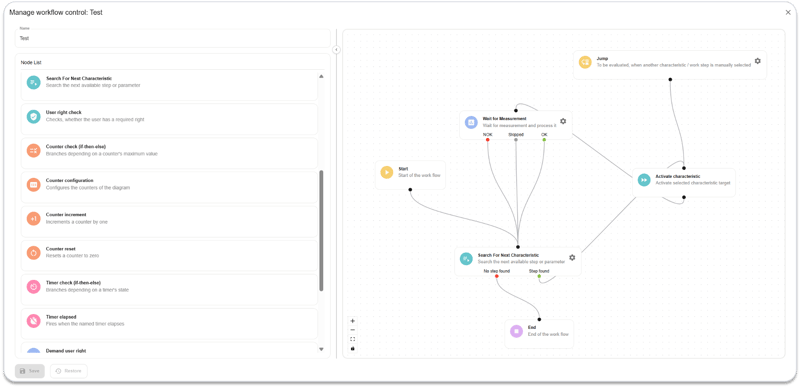
New counter nodes count events such as repetitions, NOK results, or retries and trigger follow-up actions—for example, an escalation after the third failed attempt. Process planning, work preparation, and quality management thus determine how deviations at the station are handled. Spontaneous decisions on the shop floor are replaced by a defined error-handling process; the number of attempts is freely configurable, and every trigger in the workflow can be counted and analyzed.
Visualization Editor
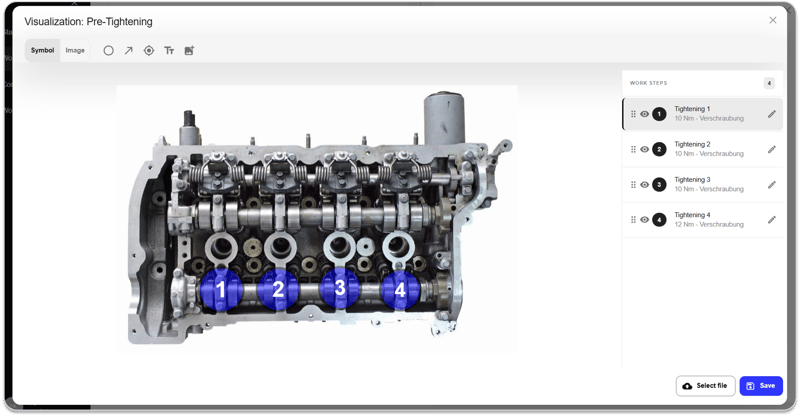
The new visualization editor operates at the workgroup level. Multiple work steps are created directly on an image or video, and the visualization is edited in the same location without the need for external tools. Work preparation and process planning teams can use it to create and maintain work plans and worker instructions in one place; image and video editing are built-in. The result is clearer instructions and a better overview of the entire workgroup.
Job Start from the Order Queue
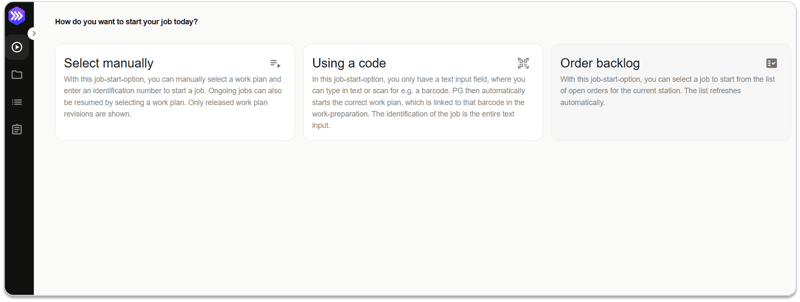
Jobs now start from an order queue populated via the REST API. The ERP system transfers orders directly to the PGX stations, and the operator selects the next job from the list. IT departments, process planning, and work preparation teams can thus connect PGX to the existing ERP system without manually transferring order data. A standard interface for order transfer to the shop floor remains in place, making it easier to start jobs and reducing data entry errors.
Release Notes for Work Plan Versions
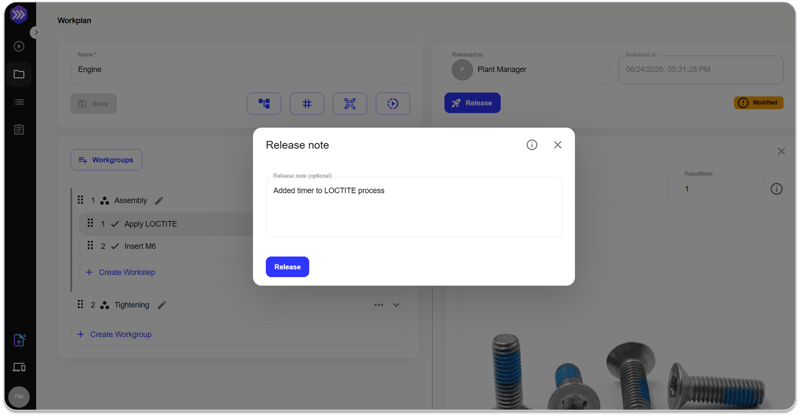
When a new work plan version is released, work planning creates a release note detailing the changes. Each operator sees this note once when they launch the new version for the first time. Work planning, the quality department, and companies with ISO 9001-certified processes thus receive a traceable change history for each released version. The operator knows what has changed before starting, and audits are prepared without the need for additional documentation.
QST: Audit-ready, statistically analyzed, and directly integrated
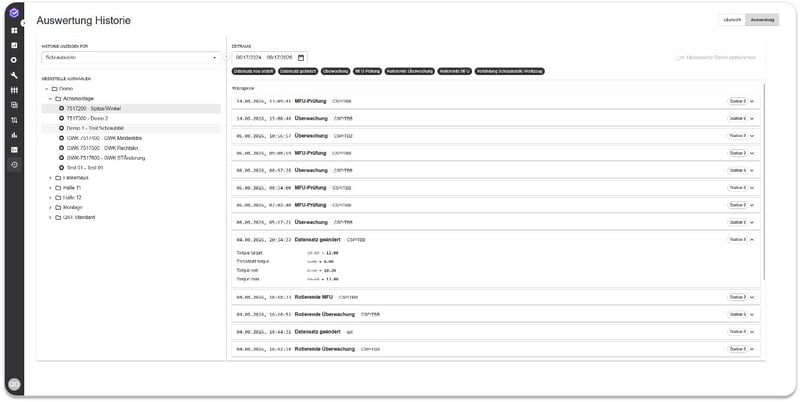
Audit trail for every change
QST now automatically logs every change to quality-related data: who changed what and when, from the old value to the new one. The complete history is available in the system at all times, without any additional effort in day-to-day operations. Quality managers, plant management, and auditors thus receive documentation at the push of a button instead of having to search through folders and Excel files—anywhere screw data must be documented, such as in accordance with IATF 16949 or VDI/VDE 2862. Limit values and test parameters no longer change unnoticed; deviations can be resolved more quickly, and responsibilities are clearly documented.
Statistical Analysis at a Glance
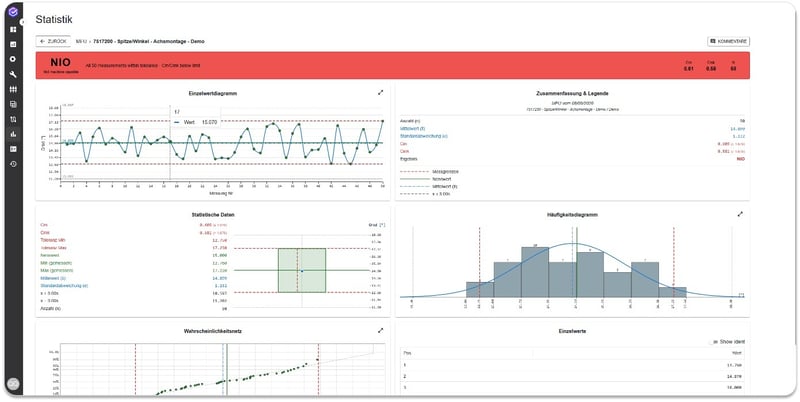
Test results are automatically evaluated and presented in an easy-to-understand format: capability indices, distribution, and trends for each fastening operation and tool, including traffic-light-style evaluation and outlier detection. Quality planning, quality assurance, process and production management, and maintenance can identify potential deviations earlier and take action before scrap or rework occurs. Analyses are generated automatically rather than in Excel, and a standardized evaluation across all locations is available for customers and audits instead of individual interpretations.
Communication and Bench Agent
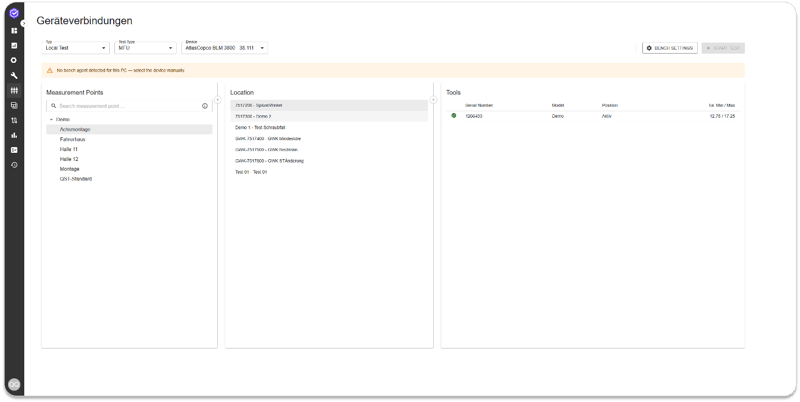
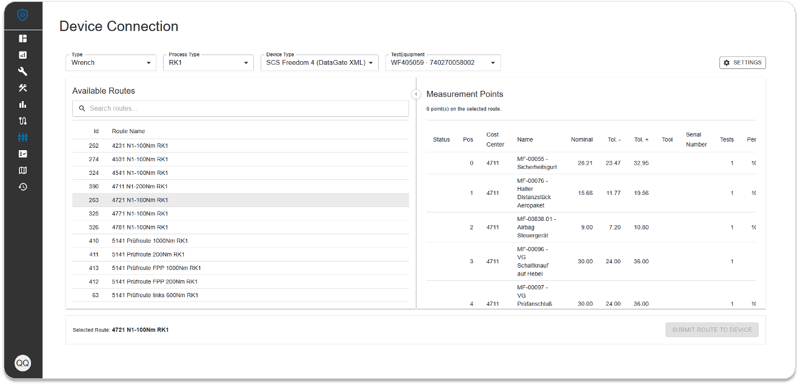
QST now communicates directly with tools, control systems, and test benches. The Bench Agent automatically transfers test orders, including specifications, to the test bench and sends the results directly back to the system. For test bench operators, metrology staff, maintenance, and quality assurance on the shop floor, duplicate data entry is eliminated, transmission errors are eliminated, and more tests can be performed per shift. The approach is manufacturer-independent, allowing different tools and test benches to be integrated using the same principle.
Reference Tables: Maintain Once, Use Everywhere
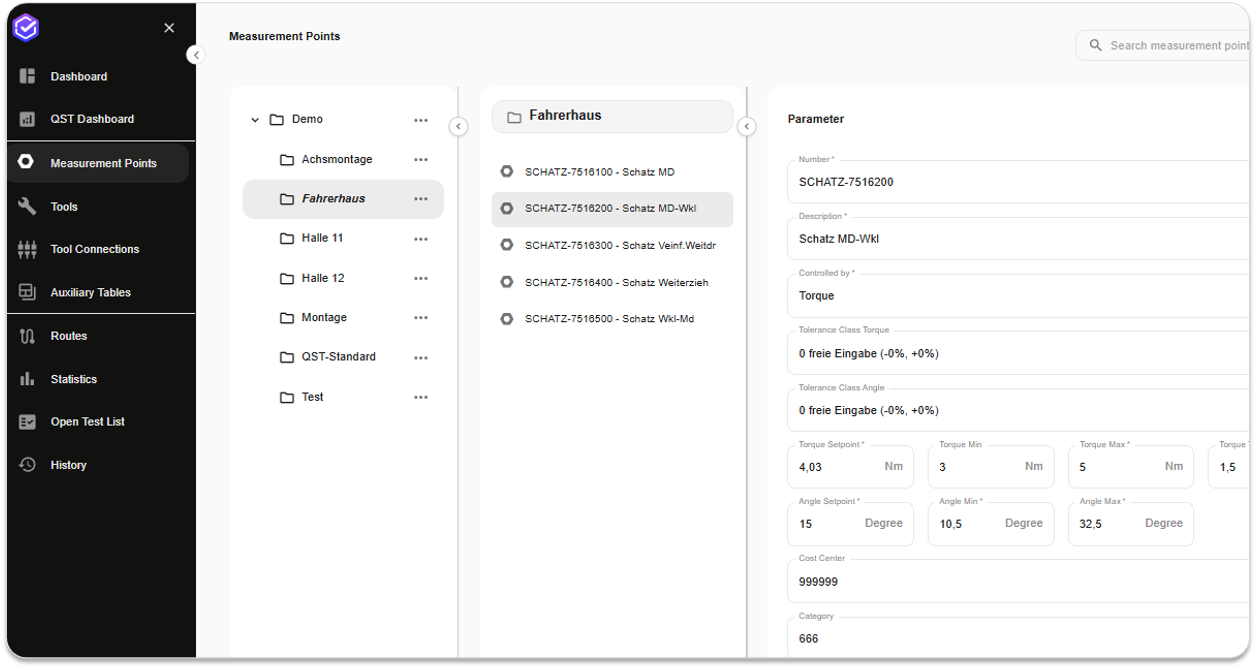
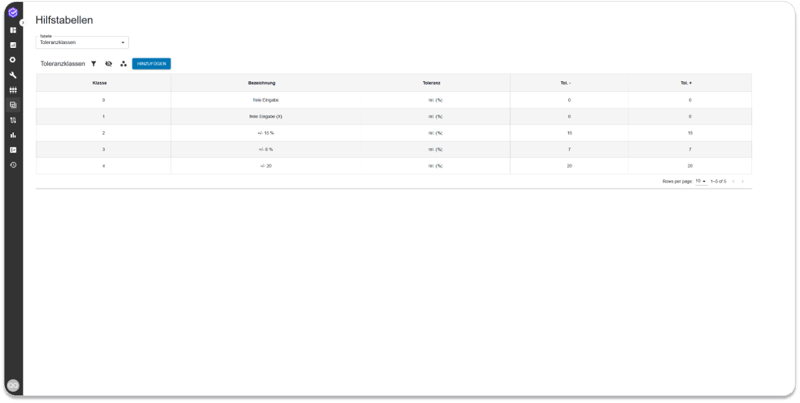
Recurring entries such as tolerance classes, tool models, cost centers, or inspection specifications are maintained centrally and made available for selection everywhere, rather than having to be retyped for each new data record. Quality planning, master data maintenance, and site managers can use this to create new fastening cases and tools in minutes, select from approved values instead of free text, and work with the same terminology across production lines and sites. A central change takes effect immediately everywhere.
CHRONOS: Archive Search in the Browser
Web Front End for Search and Research
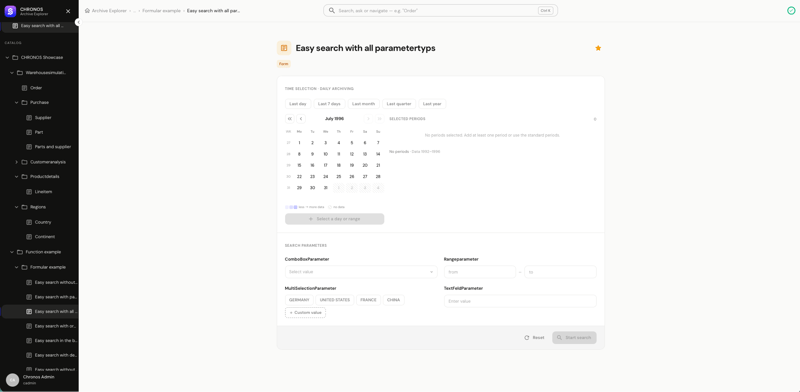
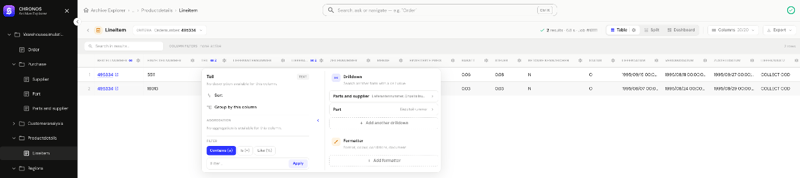
CHRONOS is getting a new browser-based front end. Archives can be searched and explored directly on the web, using a search dialog, form, descriptor view, command palette, and keyboard shortcuts. A client installation is no longer necessary. Auditors, quality and compliance teams, and plant IT can now access archived data from any workstation, using the same search and results view as in day-to-day operations. The web front end serves as the foundation for gradually replacing the Archive Explorer on the desktop.
Live Search Status
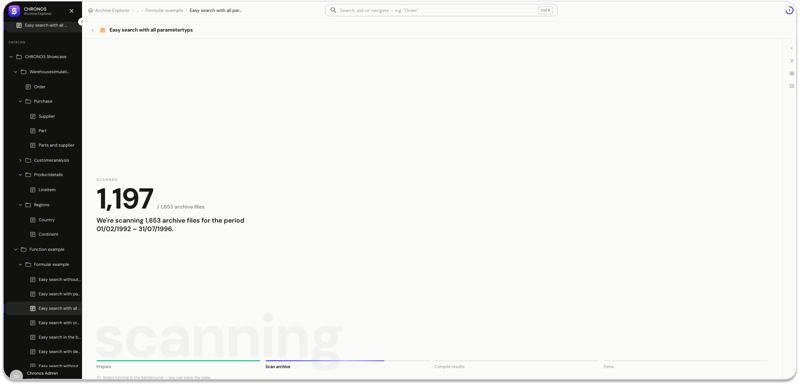
Long search runs now report their progress in real time. Each search step is displayed with its own status text; the current step is highlighted; a details window shows extended status information; and an ongoing search can be canceled. Users searching large archives—where a query takes minutes rather than seconds—can now see that the search is active, rather than staring at a blank screen. Accidentally started searches no longer block the session, and the progress messages show which step is taking the most time.
Export in Six Formats
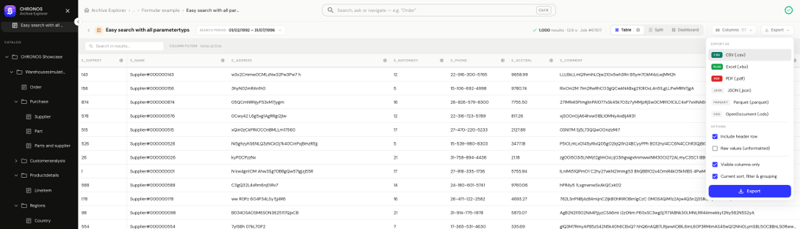
Search results can now be exported as CSV, Excel, ODS, JSON, Parquet, or PDF. The export runs within SearchServer and is delivered as a signed download link with a size limit; aggregated and calculated results can also be exported. Auditors and tax examiners thus receive the file they request, and data teams can import archived data into their own analytics tools. Large volumes of results no longer need to be loaded through the client, and access is via signed links instead of open URLs.
Results Table with Formatting and Drill-Down
The results table has been redesigned: compact mode, zebra stripes, and row numbers make long lists readable; configured formatters and styles are applied to the results; and drill-down links lead to the associated data records. This allows users working through long result lists—especially during audits and error analysis—to stay within the table instead of having to export the data first. Values appear exactly as configured, and linked records are just a click away instead of requiring a new search.
Backend for Forms, Descriptors, and Formatters
Forms, descriptors, and global formatter configurations are now created, edited, and deleted in the Archive Explorer’s backend, including a WYSIWYG editor and linked document management. The cache updates incrementally. Administrators who set up archive configurations and maintain them throughout an archive’s lifecycle can work on them all in one place. Configuration changes take effect without a full cache rebuild, and linked documents remain associated with their descriptor.
Tomcat 10.1 and Jakarta Migration
Archive Explorer includes installation, migration, and update scripts for Tomcat 10.1, enabling a guided transition of existing installations to a supported servlet container. The transition from javax to jakarta is complete. Enterprise IT and operations teams that install, operate, and update the Archive Explorer are now working with a supported container generation rather than one that has reached end-of-life. Migration and updates are performed via scripts rather than manually, and security updates for the container are once again delivered to the product.
Security Updates and CRA Readiness
Log4j 2 has been updated to 2.25.5 and backported to maintenance lines 7.19.4 and 6.1.21. The build now publishes an SBOM via Dependency Track and checks dependencies with Trivy as initial steps in preparation for the Cyber Resilience Act. Security managers, IT security teams, and anyone who responds to customer security questionnaires or requests for proposals will now receive a bill of materials for the software by release rather than upon request. Customers on older maintenance branches receive the same Log4j update, and known vulnerabilities are addressed in the product within one cycle instead of two.
SKILL: From Video to Work Plan
Send the Guide as a Work Plan to PGX
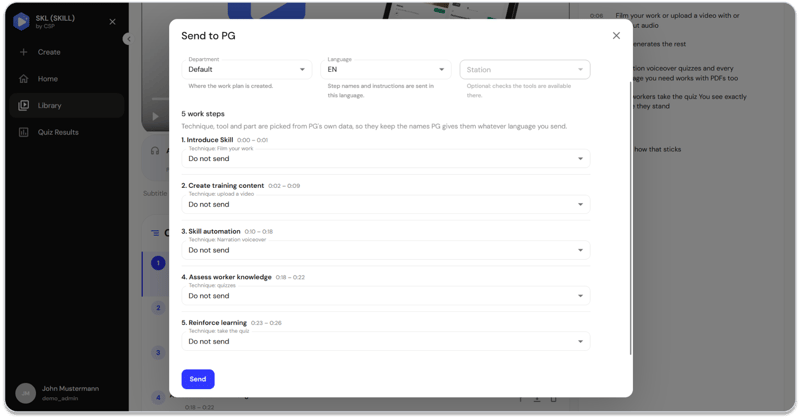
A completed SKILL guide can now be transferred directly to PGX as a work plan. Each chapter becomes a work step with instructional text, an image, and the corresponding video segment; thus, the content is created once in SKILL and used in PGX without having to be re-entered. Work preparation and quality planning teams thus receive a complete, video-guided work plan in minutes, and the worker follows the same content at the workstation. Techniques, tools, and parts are reconciled with existing PGX entries and confirmed by the user—nothing is created unnoticed.
Chapters per Work Step
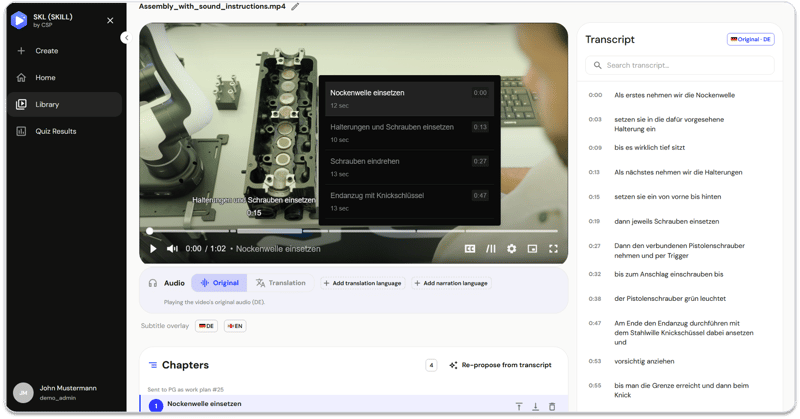
Videos are divided into chapters, one per work step. SKILL automatically suggests them based on the transcript, in every language of the guide; administrators can customize them in the editor, and the chapters appear as markers on the video’s timeline. Administrators and work planners do not have to write the structure by hand; they simply make corrections, and the same steps and titles appear in every language. The worker clicks on the markers to jump directly to the step they need.
New Voiceover After Script Corrections
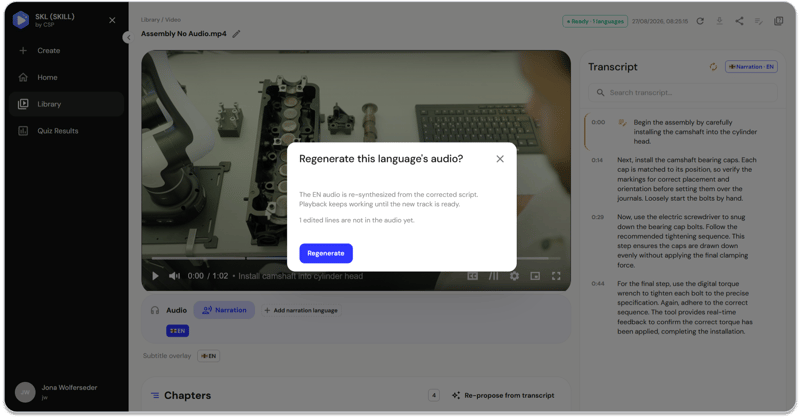
A corrected line in the voice-over or translation script can be re-recorded with a single click—using the new text, in one language or in all languages simultaneously. Administrators and content managers who review and correct the guides can thus ensure that the correct terminology is included in the audio track as well, not just in the text. A single correction applies to all languages, and the video footage remains unchanged—only the affected audio is regenerated.
A platform that grows together
Version 26.8 showcases the Manufacturing OS as a whole: a consistent user interface across all products, free choice of database in IPM, seven new features in operator guidance with PGX, end-to-end documentation and direct device connectivity in QST, archive searches in the browser with CHRONOS, and content from SKILL delivered directly to the workstation. Whether you’re working in an existing environment or just getting started with the Manufacturing OS, version 26.8 makes it clear where the platform is headed.
|
Not familiar with the Manufacturing OS yet? We’ll show you what 26.8 means for your manufacturing in a personalized demo. Schedule an appointment |